Skip to content
Special promotion
Save $350 on Einstar · Now $899
Price already applied
SKYLAB3D

Search the catalog

CATALOG / PROCUREMENT

Accessory quote list

Review accessory quantities and compatibility before preparing your itemized PDF quote. Scanner systems are configured in Configurator Studio.

Add accessories from the catalog, or choose a scanner to start a system configuration.

Browse Accessories ↗Choose a Scanner ↗

PORTABLE STRUCTURED-LIGHT 3D SCANNER

EINSTAR SHINING 3D Computer-connected 3D scanner

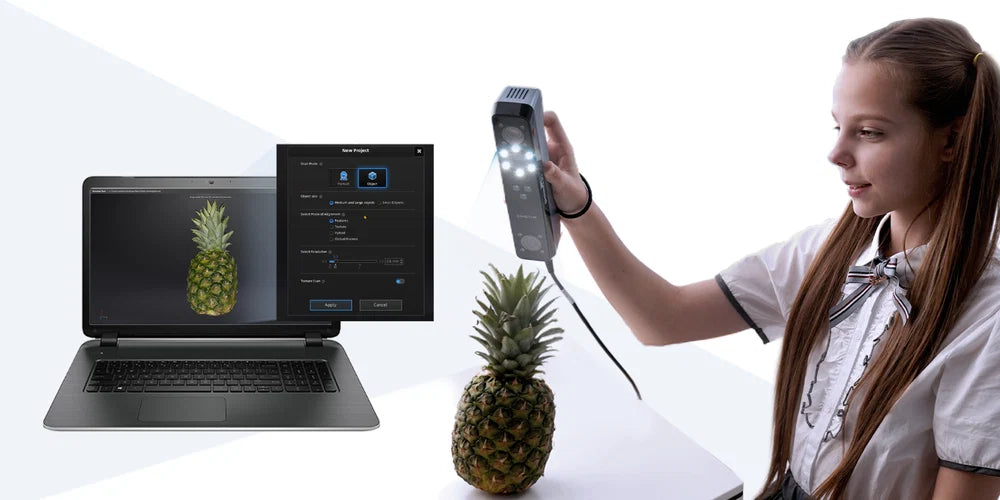
Portable, full-color 3D scanning for objects, people, art, prototypes, and scan-to-print workflows.

0.1–3 mmPoint distance
Up to 14 FPSScan speed
Full colorTexture capture
500 gScanner weight

System architecture & capabilities

Full-color capture. A clear path to your next 3D project.

Capture medium-to-large objects and prepare scan data with the included EXStar software. Check computer requirements before purchase.

0.1–3 mmPoint distance
Up to 14 FPSScan speed
Full colorTexture capture
500 gScanner weight
01Core capability

0.1 mm point distance

Capture high-density scan data with point distance down to 0.1 mm

02Core capability

Up to 14 FPS

Scan medium-to-large objects at up to 14 FPS

03Core capability

Built-in RGB camera

Preserve authentic color with the built-in RGB camera

Einstar PORTABLE STRUCTURED-LIGHT 3D SCANNER500 gProduct weight

Performance highlights

Capture detail, color, and shape.

Explore the capabilities that affect capture, output quality and day-to-day operation.

EINSTAR scan example showing detailed carved surface geometry
Feature in focusCapture detail
01 / 05

Your workflow

From a physical object to a usable 3D model.

  1. Step 01
    Capture geometry and color

    EINSTAR + EXStar

    Capture geometry and color

    Prepare the subject and capture the object with the computer-connected EINSTAR scanner.

    Geometry and color scan data

  2. Step 02
    Review and process

    EXStar included

    Review and process

    Check coverage, align the data, and prepare the mesh in the included EXStar software.

    Processed mesh

  3. Step 03
    Export to your workflow

    Downstream tools as required

    Export to your workflow

    Export OBJ, STL, PLY, P3, or 3MF for the next stage of your project.

    Supported 3D file formats

Application fit

Find the workflow that fits your project.

Explore representative use cases before confirming system fit.

3D printing and personal manufacturing

3D printing and personal manufacturing

Capture and process a subject, then prepare the mesh in your slicing software for 3D printing.

Product design and prototyping

Product design and prototyping

Use scanned geometry as a reference for replacement parts and prototype development. Shown: a fan-part scan-to-print workflow.

Automotive aftermarket reference scanning

Automotive aftermarket reference scanning

Capture reference geometry for design and fitment work. Confirm that the required detail and downstream software fit the task.

Image: SuperfastMatt, as featured on the official EINSTAR website.

Cultural heritage and art digitization

Cultural heritage and art digitization

Capture object geometry and color for digital documentation and creative workflows.

Image: SHINING 3D scan examples.

Full-body and portrait capture

Full-body and portrait capture

Capture faces and people for portrait models, creative projects, and digital-character workflows.

Research and education

Research and education

Bring physical objects into 3D learning, visualization, and project workflows.

Image: SHINING 3D product imagery.

AR, VR, and digital content

AR, VR, and digital content

Capture real objects and prepare textured assets for virtual scenes. Shown: an EINSTAR-to-Unreal Engine workflow.

Video library

Watch the workflow in motion.

Use official demonstrations, case studies, and tutorials to assess real operation.

30 technical videos

Technical video library

Product Demos

Setup & Tutorials

Workflows & Case Studies

Technical evidence

Every specification, organized for review.

Open the data set needed for engineering, IT, quality, and procurement review.

Complete data table

Open a category to review the full specification.

Physical & Operating Specifications
Physical & Operating Specifications: Einstar
Scanner dimensions220 × 46 × 55 mm
Scanner weight500 g
Carrying-case dimensions245 × 245 × 90 mm
Operating temperature0–40 °C
Operating humidity10–90%
Capture & Measurement Performance
Capture & Measurement Performance: Einstar
Point distance0.1–3 mm
Scan speed980,000 points/s; up to 14 FPS
Maximum field of view434 × 379 mm
Scan modeInfrared structured-light scan
Light sourceInfrared VCSEL structured light
Working distance160–1400 mm
Optimal working distance400 mm
Depth of field160–1400 mm
Alignment modesFeature, hybrid, texture, and global markers
Texture captureYes — built-in RGB camera
Outdoor scanningSupported
Suggested minimum object size100 × 100 × 100 mm
Computer interfaceUSB 2.0 or above
Software, Formats & System Requirements
Software, Formats & System Requirements: Einstar
Output formatsOBJ, STL, PLY, P3, and 3MF

Workstation requirements

Workstation requirements
ComponentMinimumRecommended
Operating systemWindows 10, 64-bitWindows 10/11, 64-bit
ProcessorIntel Core i7-7700HIntel Core i7-11800H or better
GraphicsNVIDIA GTX 1060NVIDIA GPU with 6 GB or more VRAM
Video memory4 GB6 GB or more
System memory16 GB RAM32 GB RAM or more
ConnectionUSB 2.0 or aboveDirect USB connection
macOSmacOS Ventura 13+, Apple silicon M1 Pro+, 32 GB RAMApple silicon M1 Pro or newer with 32 GB RAM or more

EINSTAR requires an NVIDIA graphics card on Windows. Larger scan projects require more memory; verify workstation compatibility before purchase.

Standards & Safety Compliance
Standards & Safety Compliance: Einstar
Laser safetyInfrared Class 1 under normal use
CertificationsCE, FCC, RoHS, WEEE, and KC
Download product brochure ↗

Interactive results

Inspect representative scan data.

Load a model to examine surface detail and captured geometry.

Interactive scan mesh

Portrait Model

Rotate and zoom through the captured geometry. Inspect the surface detail from every angle.

Rotate 360° Zoom Surface mesh view

Package contents

What arrives with the selected system.

Review the documented hardware, included accessories and software access for this product.

EINSTAR standard package

Scanner hardware, calibration tools, cables, and software needed to get started.

  • EINSTAR 3D scanner
  • Protective carrying case
  • USB data cable
  • Power adapter
  • Power cable
  • Cleaning mat
  • Quick Start Guide
  • Calibration board
  • 6 mm target markers
  • Calibration-board protector
  • Carrying straps
  • EXStar scanning and mesh-processing software download

Package contents may be revised by the manufacturer; confirm any time-sensitive project requirements before ordering.

EINSTAR

$899 $1,249Save $350
Est. monthly budget: $32/ mo 36 mo · 15% APR · $0 down. Illustration only.
Monthly payment options

Monthly budget illustrations assume 36 payments at 15% APR, $0 down. Taxes, shipping and fees are excluded. This is not a financing offer or approval. Payment options through Affirm are subject to eligibility. See Affirm for available terms. Taxes and any applicable shipping are calculated separately.

Compare products

{"one"=>"Select 2 or 3 items to compare", "other"=>"{{ count }} of 3 items selected"}

Select first item to compare

Select second item to compare

Select third item to compare

Compare